
Simplified Energy changelog
What's new June-August Update
New & Improved
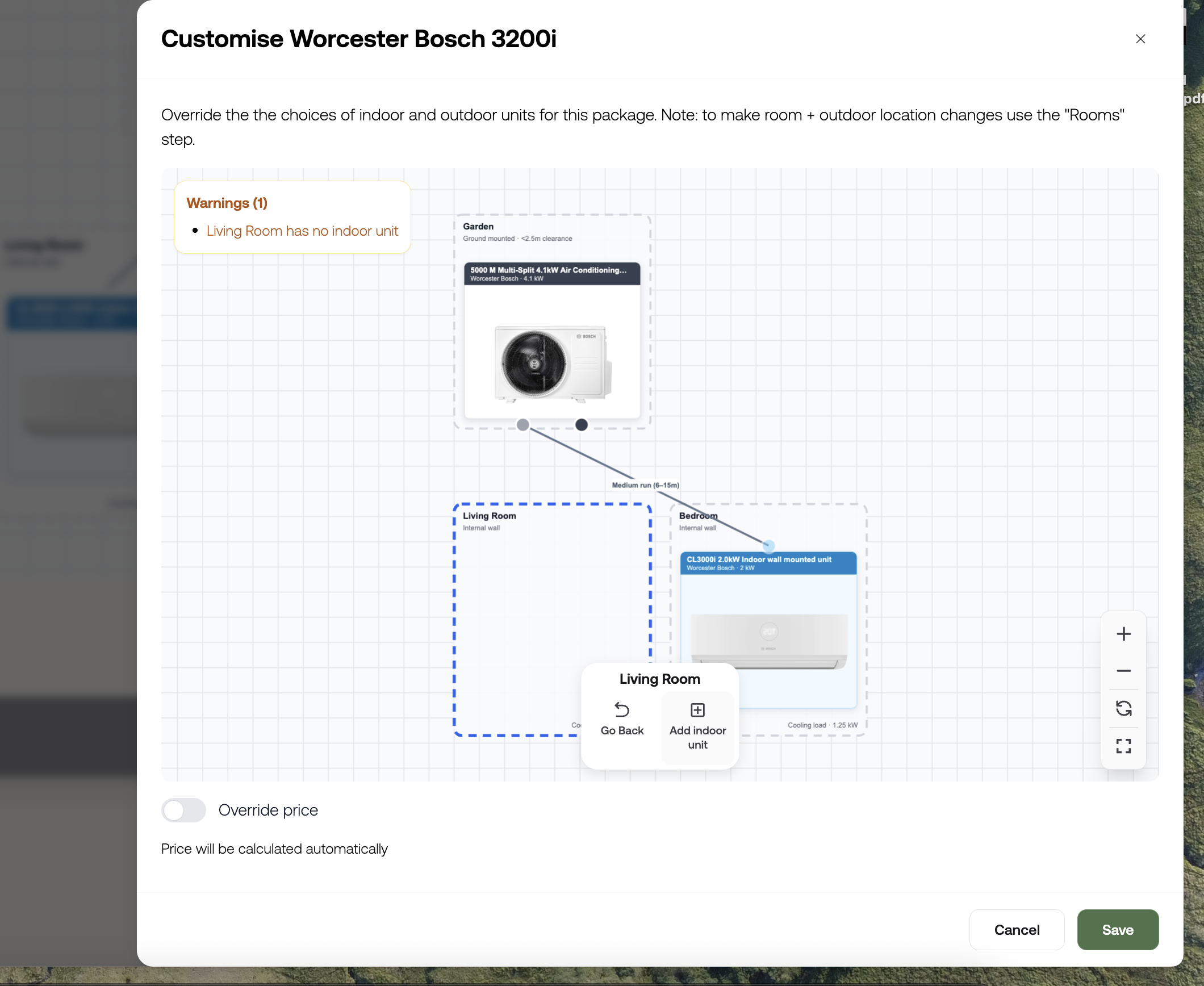
Air Con System Designer. You can now edit system designs in the Air Conditioning Quote tool directly form the System topography step. Change and add units, configure runs and select run lengths all in one place.
Proposals got a rebuild. We've rolled out a new set of building blocks for Proposals - heat loss by floor, radiator performance, hot water performance, system design, sound assessment, running costs, and a proper summary page. This means proposals now show your customers exactly what they're getting and why it works, without you having to explain it on a phone call.
HubSpot integration levelled up. If you run HubSpot, you can now bring Leads in (not just Deals), map contact and lead details properly, and have deal values update automatically as your quote or proposal changes.
Battery savings, visualised. New proposal block showing customers a clear before-and-after on battery storage - how much they save with a battery vs without one. Handy for closing the "is it worth it" conversation.
Commercial Solar Quote Tool v.1 live. Reworked charts, a cleaner opening screen, and mobile fixes. If you sell commercial solar, get in touch.
Rename "quote" to whatever you call it. You can now change what your instant quote tool calls itself - "quote", "estimate", whatever fits how you talk to your customers.
BUS Grant logic improved. Removed the EPC requirement and added the correct uplift for oil and LPG systems, so BUS grant figures are more accurate out of the box.
Control who quote/proposal emails come from. You can now set the from-address on emails sent from instant quotes and proposals, instead of it defaulting automatically.
Spruce import is smoother. Simplified the import flow (pick one project, not several), and it now handles all heating fuel types correctly - not just mains gas.
Fixes
Fixed solar production figures showing the same output regardless of panel wattage
Fixed heat loss calculations behaving oddly with certain insulation settings
Fixed incorrect savings figures and radiator counts appearing on imported proposals
Fixed PDFs: inconsistent downloads, missing product breakdowns, blank pages, missing extras quantities
Fixed postcode and address fields not populating correctly in some flows
Fixed air con design tool crashing when adding more than 4 indoor units
Fixed multisplit air con defaulting to the wrong outdoor unit setup
Fixed scrolling getting stuck on the air con topology step
Fixed customer portal login issues affecting some accounts
Fixed hardware catalogue: couldn't edit product descriptions, deleted packages not actually deleting, prices not showing in quotes
Fixed boiler planner using the wrong sizing logic for heat-only systems
Fixed flue cost not displaying correctly on boiler quotes
Fixed Tesla Powerwall 3 + expansion pack pricing on web-facing quotes
Various small fixes to Spruce data import (missing radiators, incorrect room changes, empty floors)
What's new 22/05/26
Proposals
All instant quote types can now be imported into a proposal — solar, battery, heat pump, air con, boiler
Battery instant quotes now supported for conversion into full proposals
Control over auto-generated blocks - choose which design blocks appear and whether they show in the table of contents
New status tags - mark proposals as Sent, Won, Expired, or Lost
HubSpot Connector
Proposal activity now triggers events in HubSpot - sent, viewed, accepted - and moves deals through stages automatically
Technology type and deal value now sync as separate structured fields
Bug fixes
Changing energy usage in a quote wasn't updating savings calculations - fixed
EasyPV API route change had broken wizards and project pickers - fixed
Back boiler flow was repeating questions - fixed
CRM connector was pushing data to HubSpot on package selection, before "Ready for Customer" was clicked - fixed
What's new 15/05/26
Proposals
Activity timeline — see a full history of every view and interaction on a proposal. No more guessing whether your customer has opened it.
Finance payment option — the payment schedule now supports "Finance" alongside Stripe and bank transfer.
Hide hardware pricing — hide the price on individual hardware blocks while still rolling the cost into the overall summary.
Carousel improvements — better behaviour and more controls on the horizontal carousel block.
HubSpot Connector
Quote details now come through as structured fields on the deal, not buried in a single note
Contact and lead info in HubSpot now updates automatically when it changes in Simplified Energy
Address data now splits correctly into street, city, and region
Custom deal naming — configure what your deals are called in HubSpot
Go High Level Connector
The GHL connector is now publicly available — previously limited, now open to all customers. If you're using Make.com or Zapier as a workaround, now's the time to switch.
Custom opportunity naming — configure how your opportunities are named in GHL
Solar Kiosk
Tariff intelligence — savings calculations now factor in tariff data for smarter outputs
Customer mode lock — when set to customer mode with admin full-control, customers can no longer edit the quote
Pricing trace tool — you can now trace exactly how a price has been calculated, useful for sense-checking or explaining to customers
What's new 08/05/26
Fixed payment amounts in payment schedules You can now set fixed payment amounts in a payment schedule block, rather than being limited to percentages. Useful if you need to show a specific deposit or staged payment amount.
Heat pump sizing now shows exact figures Heat pump package sizes are no longer rounded - you'll see the precise output figures, which makes specs more accurate in quotes.
Hide repeated totals in pricing blocks If you're using a final pricing summary block at the end of a proposal, you can now hide the total from individual pricing section blocks so it doesn't show up twice.
Proposal block settings are better organised Common settings across all blocks (like layout and display options) are now grouped into a separate tab in each block editor, so they're easier to find.
Bug fixes
Product images from EasyPV weren't pulling through into proposals — fixed.
Drag and drop reordering within proposal groups was behaving inconsistently — fixed.
Some users were getting errors when saving their customer profile — fixed.
What's new 01/05/26
Proposals got a big update You can now add more content blocks to your proposals - including carousels, payment schedules, and included/excluded item lists with customer requirements. Drag and drop to reorder sections, and block settings are now organised into cleaner tabs so they're easier to find.
Hide repeated pricing totals If you're using a pricing summary block at the end of your proposal, you can now hide the total from individual pricing sections so it doesn't show twice.
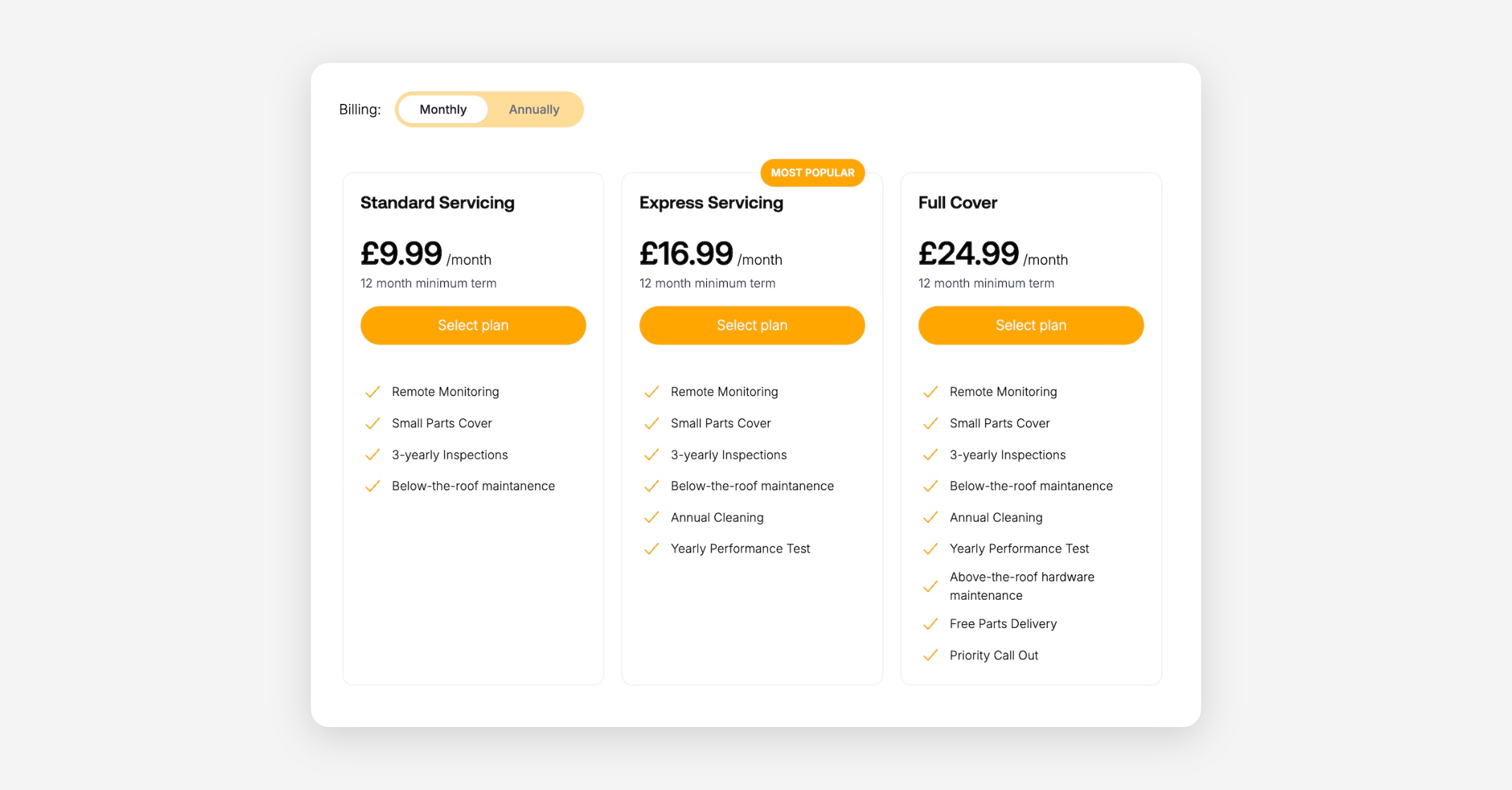
Service plan cards look better Plan cards now scroll horizontally and you can highlight one as "most popular" - useful if you want to steer customers toward a particular option.
Set a default proposal expiry You can now set a default expiry date for all proposals so you're not having to set it manually each time. Find it in Proposal Settings → Defaults.
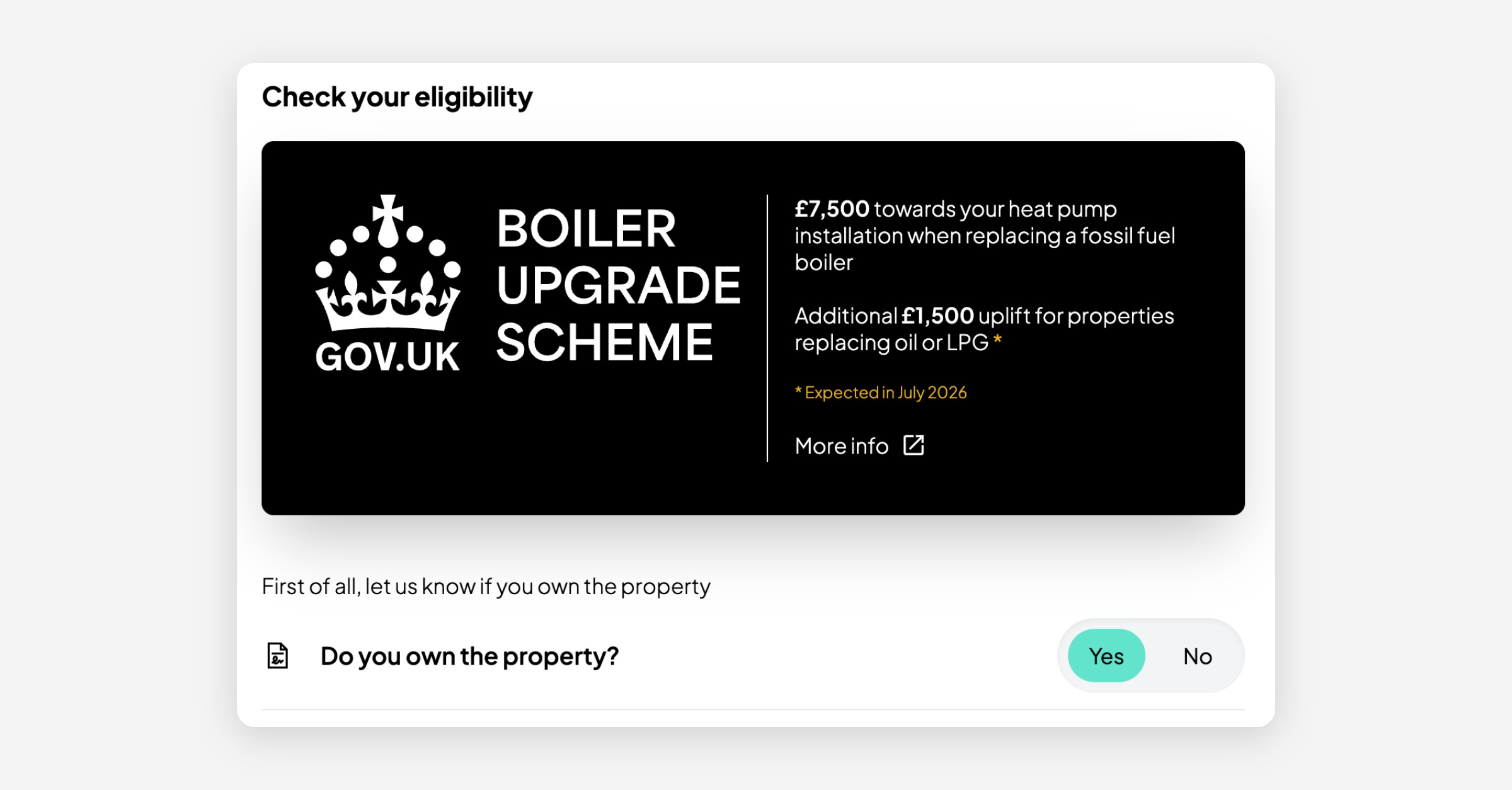
BUS grant update (heat pumps) The EPC requirement has been removed from BUS grant quotes. If the property runs on oil or LPG, the additional £1,500 uplift is now applied automatically.
Bug fixes
Some users were seeing errors when saving their profile — fixed.
Package option popups were behaving inconsistently in the editor — fixed.
Address wasn't always pulling through correctly on EasyPV proposals — fixed.
Solar panel counts were showing incorrectly in system layout blocks — fixed.
Telesales Versions for all Tools: Collaborative quote building
This release focuses on creating streamlined versions of the quote tools specifically for internal/telesales use - allowing you to build quotes on behalf of customers before sharing them as a resource to provide visual guidance and progress sales conversations.
In this video, you'll see how to proactively create quotes for customers, edit packages to give you more flexibility in what you offer, hide packages, and share a custom link with prospects that directs them to a specific stage of the journey. These features have been developed to assist with sales conversations, allowing you to collaboratively guide prospects through the process with visual aids for discussions around equipment, system setup, extras, and of course, initial energy usage and savings estimates.
Solar Quote Tool: Auto roof-detail gathering update
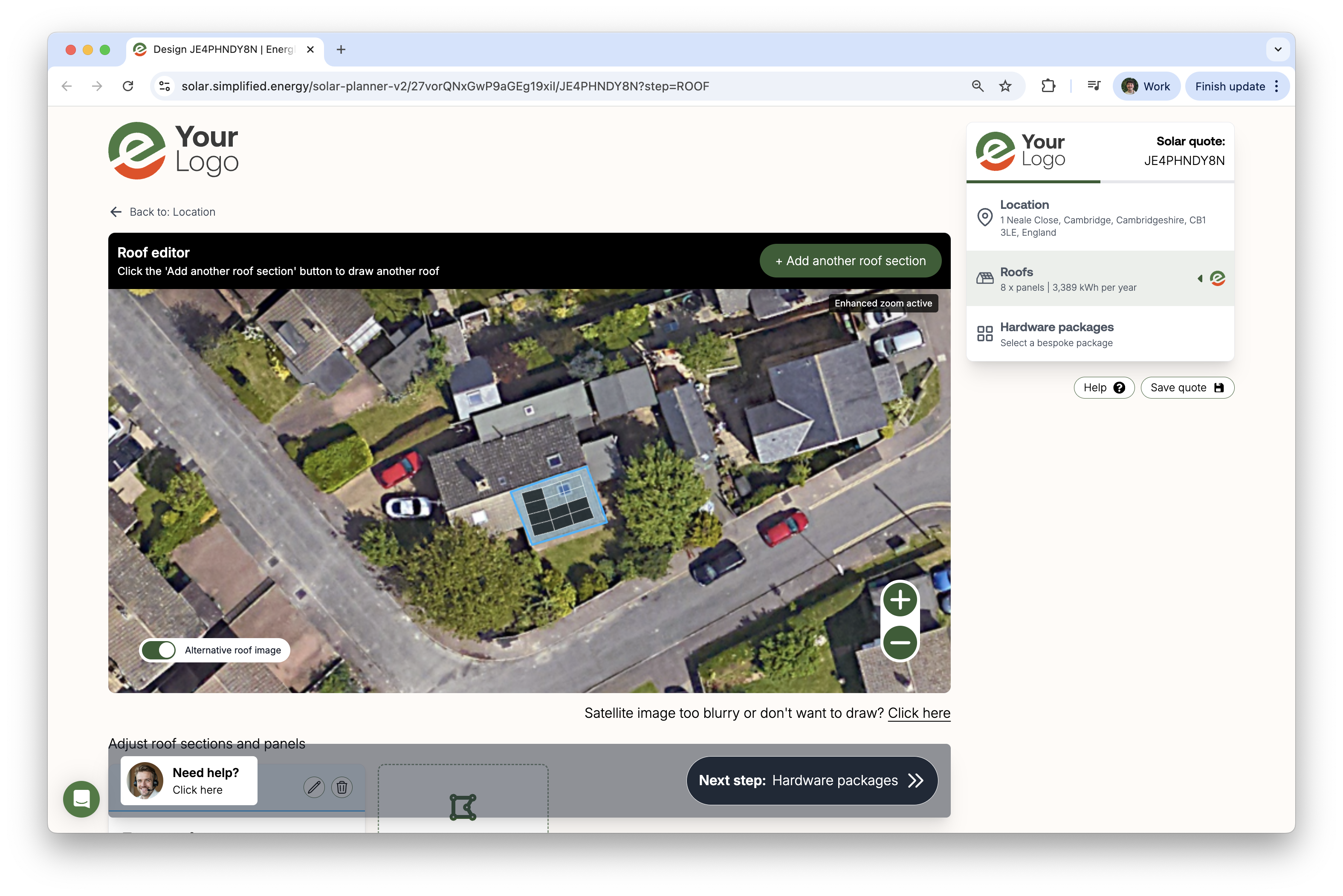
In this video, we’re excited to share the new AutoRoof detail update for our solar quote tool. We’ve introduced roof intelligence, which means users no longer need to click through multiple steps to enter roof information — instead, the system automatically retrieves data from a range of sources. It may take a few seconds to load initially, but it streamlines the process significantly.
We encourage you to explore the new options for displaying panel counts or grid layouts, and remember that the roof intelligence feature can be turned off if you prefer manual control.
We also want to highlight that our AI roof drawing tool is coming soon, and we’d love to hear your feedback or suggestions. Be sure to check our change log and product roadmap for the latest updates, and feel free to reach out if you’d like to discuss your platform in more detail.
Constrain solar quote tool with minimum and maximum number of panels
You can now constrain the Simplified Solar Instant Quote Tool to a minimum and maximum number of panels. This video explains how to set this in the installer portal and what is means in terms of end user experience.